
Choosing the potential reference sheet
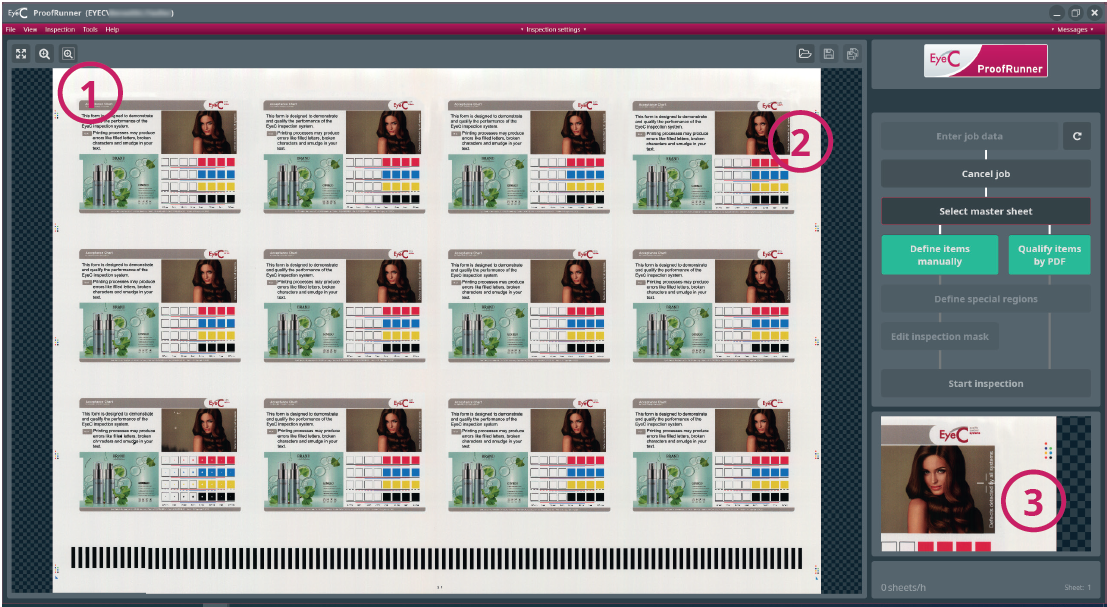
| Number | Description |
|---|---|
| 1 | Buttons for zooming in and out to view details:
|
| 2 | Display of the chosen potential reference sheet. |
| 3 |
Zoomed view of the potential reference sheet. By passing over the sheet with the mouse, the Operator can view the sheet in detail. click an area to freeze the magnifying glass. |
 Changes to the full
screen of the sheet.
Changes to the full
screen of the sheet. Zoom into an area by
clicking on this button and then on a spot on the displayed
sheet.
Zoom into an area by
clicking on this button and then on a spot on the displayed
sheet. Clicking on this
button can open a window by pointing on the reference sheet
and clicking, then dragging the mouse to include the desired
selection. The area in the window is then displayed in a
close-up view. Alternatively, use the mouse wheel for
zooming.
Clicking on this
button can open a window by pointing on the reference sheet
and clicking, then dragging the mouse to include the desired
selection. The area in the window is then displayed in a
close-up view. Alternatively, use the mouse wheel for
zooming.