
The Quality Link work process
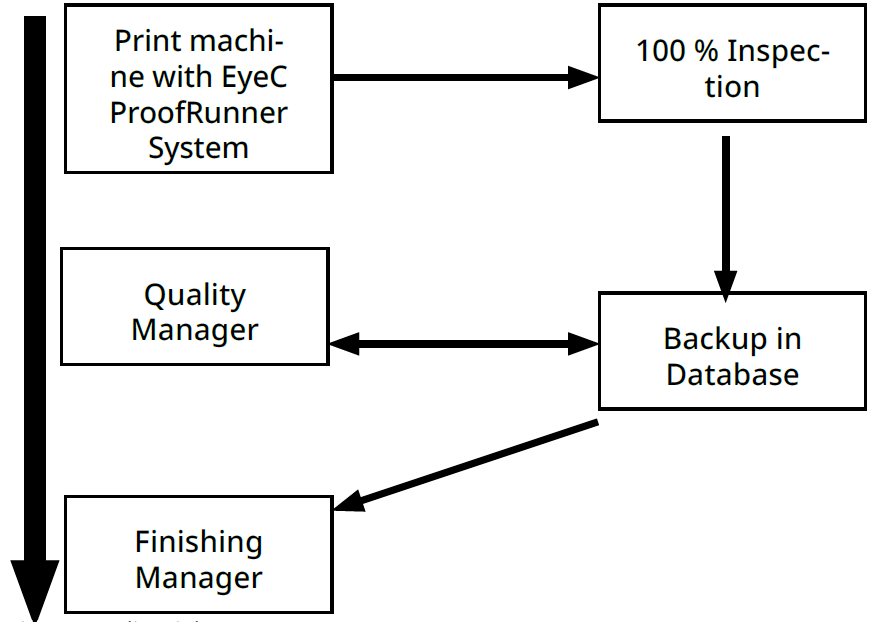
The inspection with the Quality Link system takes place fundamentally in 4 easy steps:
-
100 % inspection on the print machine with the EyeC ProofRunner.
It is already possible at this stage to evaluate flawed print results.
-
Backup the inspection results in the Quality Link database.
The data is stored centrally and even very large orders can be inspected continuously in a single piece. The inspection results can be used for further processing and re-inspection is not necessary.
NOTICE -
Pre-evaluation with the Quality Manager software.
A qualified employee can view and evaluate the inspection results so that you can offer a consistent level of high quality. Also at this point, non-critical suspicious areas can be evaluated in order to save the machine from further processing.
-
Targeted control of the locations recognized as faulty with the Finishing Manager.
You save machine runtime, have less waste, and can avoid mistakes during further processing.