The Finishing Manager interface
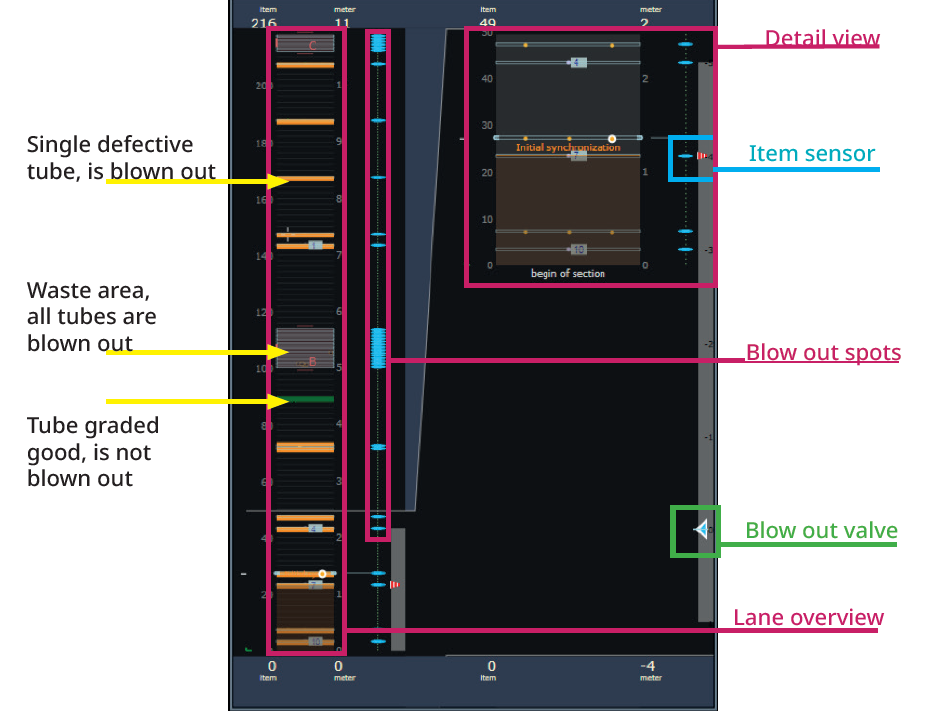
In the Finishing Manager you see the loaded roll and an enlarged detail view on the left side. In the middle of the screen you can see the deviation on the tube, on the right side an enlarged view of the error. So you can check all found and rated errors again. The Finishing Manager also marks all tubes to be blown out with a blue symbol.
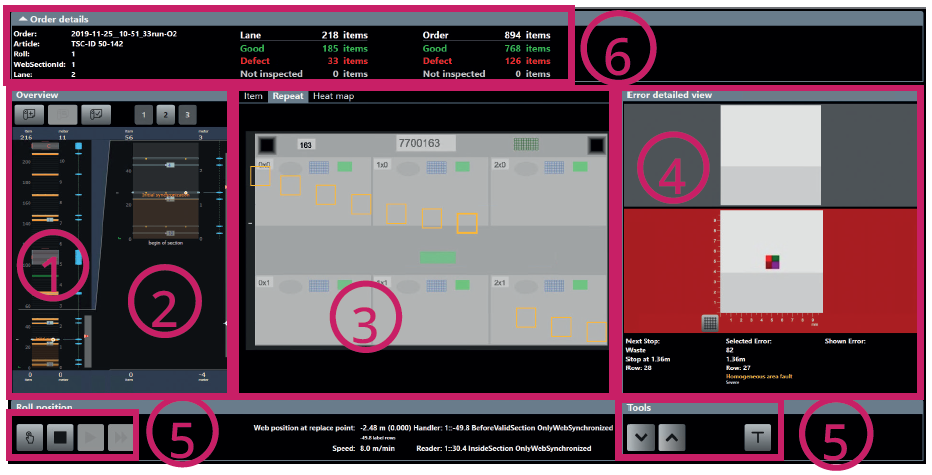
| Number | Description |
|---|---|
| 1 |
Complete overview of the roll. |
| 2 |
Detailed overview. You can zoom in and out with the mouse wheel. |
| 3 |
View of the ups. |
| 4 |
Detailed view of defective areas. |
| 5 |
Buttons for controlling the machine, if active, and for checking the graded suspicious areas. |
| 6 |
Statistics: show the values for the total number of labels, the proportion of good and bad labels for both the roll and the entire job. In addition, you see an overview of the job data. |
Detailed overview of the roll
In the detailed overview of the roll, you see all suspicious areas, just like in the Quality Manager. Tubes evaluated as “good” are shown in green. Tubes that are evaluated as “bad” and should be blown out are shown in red. You can also view suspicious areas inside of a waste area by choosing View > Show all suspects in the Finishing Manager.