
Verifying the Braille height measurement
The following prerequisites must be met:
-
Depending on the background color of the scanner, the file OQ EyeC Braille Target Verification Template White Version2.0.pdf or the file OQ EyeC Braille Target Verification Template Black Version2.0.pdf, is available.
-
The EyeC Braille Target Version 2.0 out of synthentic material is available.
-
The height measurement protocol of the EyeC Braille Target Version2.0 is available.
-
The serial numbers on the height measurement protocol and the EyeC Braille Target Version2.0 are identical.
-
The EyeC Braille Target Version 2.0 is not expired, yet (see the height measurement protocol).
-
Open the Braille tab and select the first row by clicking on the first
(leftmost) region on the progress bar. Compare the average height of the first
row as given in the High measurement protocol (A) with the Average
height value given in the last column of the Point statistics (B)
of the EyeC Proofiler.
See the following figures.
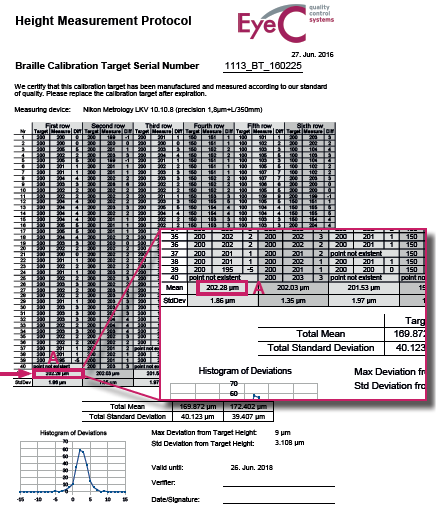
Figure 1. Height measurement protocol 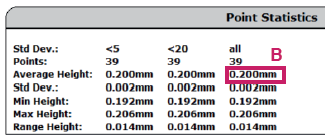
Figure 2. Point statistics protocol - If both values differ by no more than 0.020 mm, the verification is successful.
- If the values differ by more than this value, please contact your EyeC Service.